Part 6: RAG in the Wild — How AI IDEs Index Your World


Part 6: RAG in the Wild — How AI IDEs Index Your World
If you have used modern AI-powered IDEs like Cursor, Windsurf, or Zed, you have likely experienced a moment of genuine awe. You type @codebase or ask a question about an obscure utility function in another directory, and the AI correctly identifies exactly which files to look at.
It feels like magic. But as we have explored throughout this series, there is no magic in production—only data engineering and optimized retrieval.
This post peels back the curtain on how these tools manage to "index your world." We will move from the high-level user interface down to the low-level indexing pipelines that turn millions of lines of code into a searchable, high-dimensional map.
The Massive Search Space: why Code is Different
In our earlier deep dives, we discussed RAG in the context of static PDFs. Code, however, presents a unique set of challenges:
- Reference Density: A single file in a React project might import twenty other modules. To understand one file, the system must often understand the structure of the entire repository.
- Structural Meaning: In a PDF, proximity usually implies relationship. In code, a function defined on line 50 might be more related to a class defined in another file three directories away than to the comment on line 49.
- Frequency of Change: Codebases are living organisms. Every time you save a file, the "map" of your project needs to update without burning out your CPU or draining your battery.

The Indexing Lifecycle: How the Map is Built
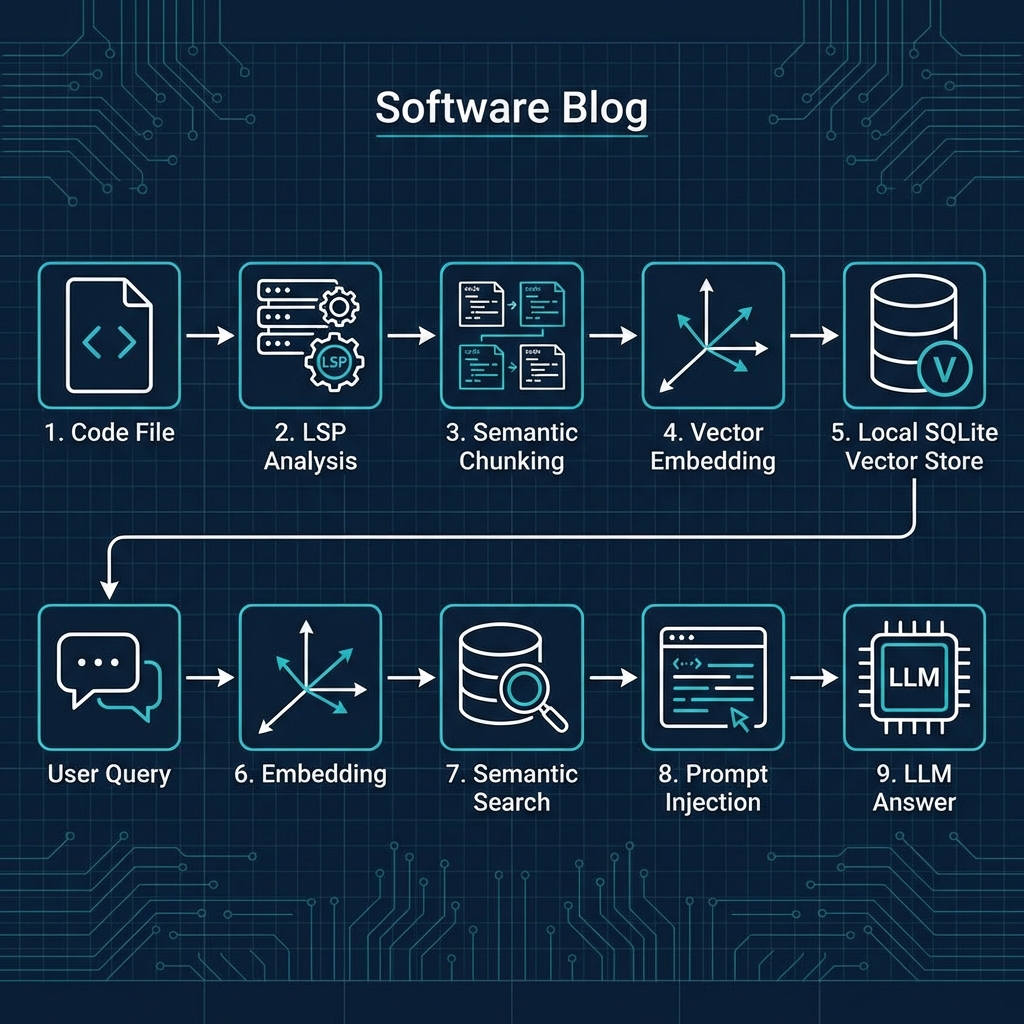
When you first open a large project in an AI IDE, you will often see a progress bar indicating that it is "Indexing." Here is what is happening under the hood:
1. Structural Analysis (LSP Integration)
Before a single line is sent to an embedding model, the IDE uses the Language Server Protocol (LSP) or treesitter. Instead of treating your code as raw text, it parses it into an Abstract Syntax Tree (AST).
This allows the indexer to know: "This block is a function called calculate_tax," and "This block is a constant called TAX_RATE." This structural awareness is critical for the next step.
2. Semantic Chunking
Instead of splitting code every 500 characters (which would cut functions in half), AI IDEs use Semantic Chunking. They try to keep logical units together. A chunk is usually a complete function, a class definition, or a clear logical block.
By adding metadata (like the file path and line numbers) to these chunks, the retriever ensures that when it finds the code, it also knows exactly where it lives.
3. The Local Vector Store
Most AI IDEs do not upload your entire codebase to a remote server for indexing. It would be a privacy nightmare and extremely slow. Instead, they use a Local Vector Database.
Tools like SQLite with vector extensions (like sqlite-vss) or lightweight libraries like Faiss allow the IDE to store your code's embeddings directly on your machine. This is why search results appear almost instantly—there is no network round-trip for the retrieval layer.
The Retrieval Pipeline: How @codebase Finds the Answer
When you trigger a codebase search, the IDE performs a multi-stage retrieval process:
- Keyword/Symbol Search (BM25): If you mention a specific function name, the system uses classic lexical search (like we discussed in Part 4) to find exact matches.
- Semantic Retrieval: It embeds your natural language question and performs a similarity search in the local vector store to find "semantically similar" concepts.
- Context Expansion: Once the top 5-10 chunks are found, the IDE "expands" them. It pulls in a few surrounding lines or looks at the file's imports to provide the LLM with enough context to actually understand the code it is reading.
Implementation: Building a Basic Code Indexer
To understand how this works in practice, let's build a simplified Python-based code indexer. We will use pathlib for file traversal and a conceptual vector store interface.
import os
from pathlib import Path
from typing import List, Dict

class CodeIndexer:
    def __init__(self, codebase_path: str):
        self.root = Path(codebase_path)
        self.ignore_list = {'.git', 'node_modules', '__pycache__', 'dist'}
        # In a real IDE, this would be a local SQLite vector store
        self.index = []

    def is_text_file(self, file_path: Path) -> bool:
        return file_path.suffix in {'.py', '.js', '.ts', '.tsx', '.go', '.rs'}

    def chunk_file(self, content: str) -> List[str]:
        """
        A simplified semantic chunker.
        In production, this would use a treesitter to split by function/class.
        """
        # Split by double newline as a proxy for logical blocks
        return [c.strip() for c in content.split('\n\n') if len(c.strip()) > 20]

    def index_project(self):
        print(f"Indexing project: {self.root}")
        for file_path in self.root.rglob('*'):
            if any(part in file_path.parts for part in self.ignore_list):
                continue

            if file_path.is_file() and self.is_text_file(file_path):
                content = file_path.read_text(errors='ignore')
                chunks = self.chunk_file(content)

                for i, chunk in enumerate(chunks):
                    # We store the metadata so the AI can reference the file
                    self.index.append({
                        "file": str(file_path.relative_to(self.root)),
                        "chunk_id": i,
                        "text": chunk,
                        # "embedding": self.model.encode(chunk) # Conceptual
                    })
        print(f"Indexed {len(self.index)} chunks across your files.")

# Usage
indexer = CodeIndexer('./my_project')
indexer.index_project()
The Future: Contextual Awareness
The next frontier for AI IDEs is Contextual Awareness. Instead of just looking at the files you have open, future IDEs will maintain a "working memory" of your current task.
If you just spent ten minutes fixing a bug in the database layer, the RAG system will prioritize database-related files in its next retrieval, even if your question is about the UI. This is called Activity-Based Retrieval, and it is what will eventually make AI feel less like a tool and more like a pair programmer.
Conclusion: Mastering the Map
Understanding RAG at the IDE level transforms how you interact with your tools. You stop seeing @codebase as a lucky guess and start seeing it as a predictable result of good indexing and structural awareness.
Until then, keep @ing your files and trust the mathematics of the map.
🚀 Next Up: Part 7 — Mastering Agentic Workflows
Retrieval is only half the battle. To truly be efficient, you need to move beyond the chat box. In the next part, we'll teach you how to build Skills and Workflows to automate your developer life.