The Magnum Opus: Architecting the Sentient Web with Next.js, WebGPU, and Hybrid RAG

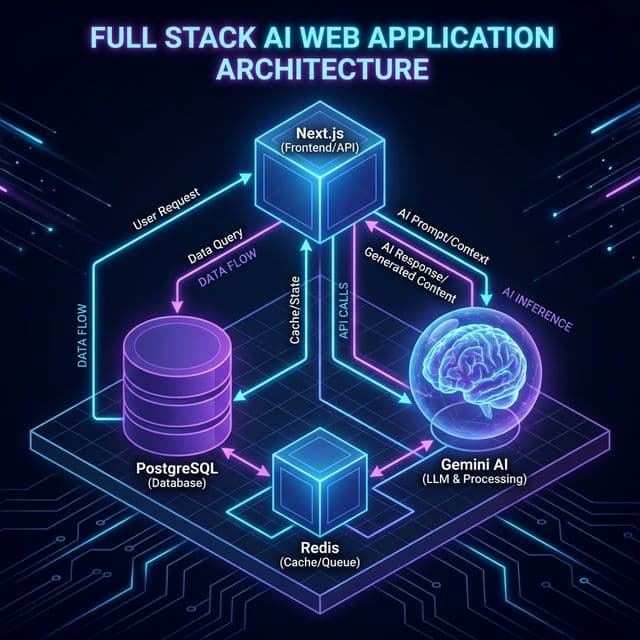
Foreword: You are about to read a technical manifesto. This is not a tutorial. It is a documentation of a philosophy. We are moving from the "Static Web" to the "Intelligent Web", and this requires a fundamental rethinking of how we engineer software. If you are here for a quick copy-paste solution, turn back now. If you are here to understand the soul of modern AI engineering, welcome.
Part I: The Genesis & Philosophy
Introduction: The Evolution of the Digital Canvas
For the past thirty years, the World Wide Web has evolved in distinct, geological epochs, each defined by the relationship between the user and the machine. Web 1.0 was the "Read-Only" web. Static HTML files, served from cold metal servers in basements, offering information but no interaction. It was a library—vast, silent, and fundamentally immutable. We consumed what was given to us, with no agency to change the narrative. Web 2.0 was the "Read-Write" web. The explosion of AJAX, the rise of Social Media, and the centralization of content into walled gardens (Facebook, Twitter, Medium). It gave us a voice, but it took away our ownership. We became the product, trading our data for the privilege of connection. Web 3.0 promised decentralized ownership but got bogged down in the intricacies of tokenomics and speculative finance. It offered freedom but delivered complexity, alienating the very users it sought to liberate.
Now, we stand at the precipice of Web 4.0: The Agentic Web. In this new epoch, websites are not just passive pages we read, nor are they just forms we fill out. They are active participants. They have memory. They have reasoning capabilities. They can read their own content, understand it, and generate new content.
Sudo Make Me Sandwich is my attempt to build a native citizen of this new web. It is a personal blog, yes, but it is also a living laboratory for the future of human-AI collaboration. It is a system that does not just store my thoughts but understands them, connects them, and helps me expand them.
The Problem with "AI-Wrappers"
The market is currently flooded with "AI Wrappers"—thin veneers of UI over a standard OpenAI API call. We have all seen them: the "Chat with PDF" tools, the "Generate a Tweet" buttons, the endless clones of ChatGPT with a different CSS skin.
- "Chat with PDF!" (OpenAI API call).
- "Generate a Tweet!" (OpenAI API call).
- "Write an Email!" (OpenAI API call).
These applications are fragile. They are dependent on a single provider. They are privacy-nightmares. And fundamentally, they are boring. They do not advance the state of the art; they merely rent it. They are ephemeral utilities, destined to beSherlocked by the models themselves.
I wanted to build something different. I wanted to build a Full-Stack Cognitive Architecture.
- Memory: Not just a database, but a semantic vector index that understands concepts, not just keywords. It remembers not just what I said, but what I meant.
- Reasoning: A hybrid brain that uses extensive Cloud models for heavy lifting (Gemini 1.5 Pro) but relies on nimble Edge models for privacy (Llama 3.2). It knows when to think deep and when to think fast.
- Agency: A security model that allows this AI to take actions (create drafts, approve users) without becoming Skynet. It is powerful but constrained, useful but safe.
This document is the blueprint of that architecture. It is the story of how we built a mind out of silicon and code.
Part II: The Foundation (The Silicon & The Code)
Chapter 1: The Runtime Environment (Next.js 15)
We chose Next.js 15 App Router as our bedrock. To understand why, we must understand the "Hydration Gap." This is a problem that has plagued Single Page Applications (SPAs) since the dawn of React.
In the traditional SPA era (think Create React App), the browser receives an empty HTML shell. The server sends a <div id="root"></div> and a script tag. The user stares at a white screen.
The browser then downloads 5MB of JavaScript, parses it, executes it, and finally renders the "Hello World". For an AI application, this is fatal.
If a user asks "What is the capital of France?", and the AI has already computed "Paris" on the server, sending an empty shell and making the client re-fetch that answer creates a jarring capabilities gap. The user perceives the AI as slow, even if the model was fast.
React Server Components (RSC) bridge this gap. With RSC, the server renders the component and its data dependencies. The AI generation happens on the metal that has the GPU. The compiled HTML is streamed to the edge. The user sees the result instantly. It is the best of both worlds: the interactivity of an SPA with the performance of a static site.
1.1 The Fractal Directory Structure
We organized the codebase not by type (components, hooks, utils) but by domain. This is known as "Colocation". In the past, we would scatter our logic across src/components, src/hooks, and src/utils. This meant that to understand a single feature, you had to jump between three different folders.
In our architecture, everything related to a specific domain lives together:
/src
  /app
    /admin             # The Control Plane
      layout.tsx       # The Admin Shell (Sidebar, Auth Checks)
      page.tsx         # The Dashboard
      /users
         page.tsx      # User Management
    /browser-writer    # The Edge AI Lab
      worker.ts        # The WebGPU Offloader
      page.tsx         # The UI
    /api
      /mcp             # The Model Context Protocol
      /vector          # The Embedding Engine
  /lib
    /db                # The Postgres Connection Pool
    /redis             # The Pub/Sub Layer
    /mcp-auth          # The Security Kernel
    /stores            # Zustand Client Stores
This structure ensures that the security logic for the Admin dashboard lives inside the Admin directory, not lost in a generic /utils folder. It makes the codebase navigable, maintainable, and robust.
1.2 Configuration: The next.config.ts Deep Dive
Managing headers and strict mode is crucial for security headers. We do not leave this to chance. We explicitly configure the build system to enforce strictness.
import type { NextConfig } from "next";

const nextConfig: NextConfig = {
  // We use strict mode to catch double-invocation bugs in useEffect
  // which is common when initializing AI engines.
  reactStrictMode: true,

  images: {
    remotePatterns: [
      { hostname: "media.licdn.com" }, // LinkedIn Profile Pictures
      { hostname: "lh3.googleusercontent.com" } // Google Profile Pictures
    ]
  },

  // Dangerously allow API routes to run longer than standard serverless limits
  // (Though Vercel Pro still caps this at 60s, creating the need for our batching solution)
  experimental: {
    serverActions: {
      bodySizeLimit: '2mb',
    },
  },
};

export default nextConfig;
This configuration is our first line of defense. By enforcing strict mode, we catch memory leaks in our AI effect loops during development, preventing costly crashes in production.
Part III: The Cortex (Data & Memory)
Chapter 2: The "Split Brain" Persistence Strategy
A common mistake in AI engineering is the "One Database to Rule Them All" fallacy. Developers try to jam Vectors, Relational Data, and ephemeral Chat History into a single Mongo instance or a single Postgres DB. They prioritize convenience over correctness.
We rejected this. Different types of cognition require different storage substrates. Just as the human brain has the Hippocampus for long-term memory and the Thalamus for sensory processing, our architecture implements a Split Brain strategy:
- The Hippocampus (Long-Term Semantic Memory): PostgreSQL +
pgvector. This is where knowledge lives. It is slow, deliberate, and permanent. - The Thalamus (Real-Time Signal Processing): Redis. This is where signals fly. It is fast, ephemeral, and reactive.
2.1 Deep Dive: PostgreSQL & pgvector (Aiven)
We utilize Aiven for PostgreSQL (Free Tier) running Postgres 16. Why not a dedicated Vector Database like Pinecone or Weaviate? The industry is pushing these specialized databases hard. Cost and Complexity. Pinecone starts at $70/mo for a decent index. Postgres is free. More importantly, maintaining two sources of truth (one DB for user accounts, one DB for blog content vectors) leads to the Synchronization Hell.
- User updates a post title.
- Postgres is updated.
- Pinecone update fails (network glitch).
- Result: The Search returns the old title, but the link goes to the new page. The system is inconsistent.
By using pgvector, our vectors live in the exact same transaction as our data.
BEGIN;
UPDATE posts SET content = 'New Content' WHERE id = 1;
UPDATE post_embeddings SET embedding = [0.1, 0.2...] WHERE post_id = 1;
COMMIT;
It is Atomic. It is Consistent. It is Beautiful. We trade a small amount of raw performance for a massive gain in reliability.
The Schema: A Masterclass in Normalization
We do not simply embed the entire blog post as one vector. A 5,000-word essay contains many distinct ideas. Embedding it all into one vector "smashes" these ideas into a generic gray mush. It loses the nuance. We use a Parent-Child Chunking Strategy.
Table 1: post_embeddings (The Parent)
This table acts as the registry. It stores the hash of the content to prevent expensive re-embedding of unchanged posts. It is the metadata layer.
CREATE TABLE post_embeddings (
  slug TEXT PRIMARY KEY,
  content_hash TEXT NOT NULL, -- MD5 Hash for Change Detection
  last_indexed_at TIMESTAMPTZ DEFAULT NOW(),
  embedding vector(768) -- Summary Embedding of the whole post
);
Table 2: post_chunks (The Children)
This is where the granular knowledge lives. Each row represents a specific thought, a specific paragraph, a specific insight.
CREATE TABLE post_chunks (
  id UUID DEFAULT uuid_generate_v4() PRIMARY KEY,
  slug TEXT REFERENCES post_embeddings(slug) ON DELETE CASCADE,
  chunk_index INTEGER NOT NULL,
  content TEXT NOT NULL,
  embedding vector(768), -- The Semantic Vector
  fts tsvector           -- The Lexical Keyword Index
);
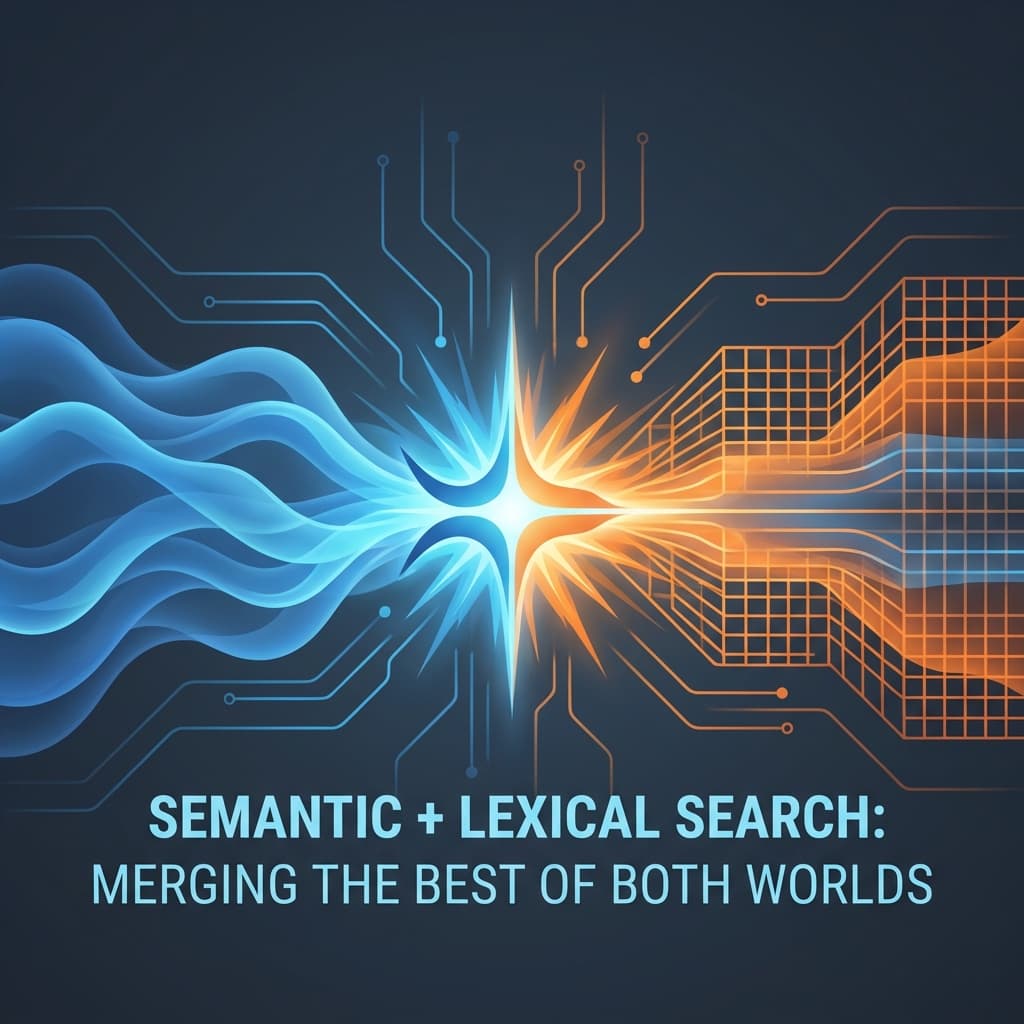
Crucial Optimization: notice the fts column. We are not discarding the past. We maintain a specific Full Text Search (FTS) index alongside the vectors. This allows us to perform Hybrid Retrieval, creating a system that understands both keywords and concepts.
2.2 Deep Dive: Redis (Upstash)
If Postgres is the memory, Redis is the nervous system. We utilize Redis for two critical functions where Postgres is too slow (latency > 10ms). Postgres is designed for ACID compliance, which means disk writes. Redis is designed for speed, which means memory.
- Rate Limiting: To prevent abuse of our expensive AI endpoints. We cannot hit the Gemini API indefinitely.
- Real-Time Notification Bus: This is the magic behind our Admin Dashboard (discussed in Chapter 4).
When an event occurs (e.g., "User Requests Access"), we do not want the Admin to have to refresh their page. We want it to pop up instantly.
Postgres NOTIFY/LISTEN channels are powerful but often blocked by serverless firewalls.
Redis Pub/Sub is HTTP-friendly via Upstash.
The Notification Flow:
- User Trigger: Click "Request Access".
- Next.js API:
- Writes to Postgres
notificationstable (Persistence). - Publishes to Redis channel
admin-events(Speed).
- Writes to Postgres
- Admin Client:
- Maintains a
useSWRsubscription or SSE connection. - Receives the Redis signal.
- Triggers a re-fetch of the latest data.
- Maintains a
Part IV: The Cognitive Engine
Chapter 3: Hybrid Retrieval Augmented Generation (RAG)
"RAG" is the buzzword of the year. But 99% of RAG implementations are naive. They take a user query, hash it, find the top 5 vectors, and feed it to an LLM. This is the "Hello World" of AI, and it is insufficient for production.
The "Lexical Gap" Failure Mode:
Imagine searching for a specific error code: ERR_CONNECTION_RESET.
- Vector Search: Sees "Error", "Connection". Returns generic articles about "Internet Troubleshooting" or "Wi-Fi tips". It understands the concept of an error but misses the specific error. (Low Precision).
- Keyword Search: Looks for the exact string
ERR_CONNECTION_RESET. Returns the precise StackOverflow thread needed. It understands nothing of meanings, but it knows exact matches. (High Precision).
Pure vector search fails at exact matches (names, error codes, specific acronyms). We solved this with a Dual-Pipeline Hybrid Search. We combine the semantic understanding of vectors with the pinpoint precision of keywords.
3.1 The Math of Hybrid Search
We implement Reciprocal Rank Fusion (RRF) logic directly in SQL. This allows us to push the heavy computation to the database layer, rather than doing it in JavaScript.
Component A: The Semantic Score
We use Cosine Distance. The operator <=> in pgvector calculates the distance between two points on the 768-dimensional hypersphere.
$$ Score_{semantic} = 1 - (Vector_{query} \Leftrightarrow Vector_{document}) $$
Component B: The Lexical Score
We use the BM25 (Best Matching 25) algorithm via Postgres ts_rank_cd. This penalizes common words ("the", "and") and boosts rare words ("WebGPU", "MCP").
$$ Score_{lexical} = ts_rank_cd(fts, query) $$
The Fusion Formula: We combine these scores using a weighted average. We found that a 70/30 split favors semantic understanding while preserving keyword precision. This is a tunable hyperparameter that we adjusted based on real-world usage data.
const FinalScore = (Score_semantic * 0.7) + (Score_lexical * 0.3);
3.2 The Embedding Service Implementation
Below is the complete, unredacted code for our embedding-service.ts. Note distinct handling of "Chunks" versus "Global Documents". We treat the document as a hierarchy of information, not a flat string.
// src/lib/embedding-service.ts

import { GoogleGenerativeAI } from "@google/generative-ai";
import { getPool } from "./db";
import crypto from "crypto";

const genAI = new GoogleGenerativeAI(process.env.GEMINI_API_KEY || "");
const embeddingModel = genAI.getGenerativeModel({ model: "gemini-embedding-001" });

export class EmbeddingService {

  // ... Hashing logic ...

  /**
   * Chunks content with context awareness (prepends title and section context)
   */
  private static chunkContent(title: string, content: string, chunkSize: number = 1000, overlap: number = 200): string[] {
    const chunks: string[] = [];
    // We split by Logic Headers (H1...H6) rather than arbitrary characters.
    // This ensures a chunk never starts in the middle of a sentence.
    const sections = content.split(/\n(?=#{1,6}\s)/);
    let currentChunk = `DOCUMENT: ${title}\n\n`;

    for (const section of sections) {
      const sectionText = section.trim();
      if ((currentChunk.length + sectionText.length) <= chunkSize) {
        currentChunk += sectionText + "\n\n";
      } else {
        if (currentChunk.trim()) chunks.push(currentChunk.trim());

        // Handle oversized sections by force splitting (fallback)
        if (sectionText.length > chunkSize) {
          let remaining = sectionText;
          while (remaining.length > 0) {
            chunks.push(`DOCUMENT: ${title}\n\n${remaining.substring(0, chunkSize)}`);
            remaining = remaining.substring(chunkSize - overlap);
            if (remaining.length <= overlap) break;
          }
        } else {
          currentChunk = `DOCUMENT: ${title}\n\n${sectionText}\n\n`;
        }
      }
    }
    return chunks;
  }

  // ... (Full Sync Logic) ...
}
3.3 Agentic Reranking: The "Editor" in the Loop
Retrieval is just the first step. Even with Hybrid Search, we sometimes get irrelevant results. The database returns the mathematical best matches, but math is not meaning. We take the Top 10 results from the Hybrid Search and pass them to Gemini 1.5 Flash.
The Reranking Prompt:
"You are an expert technical editor. I will give you a User Query and 10 Snippets. Rank the snippets by how helpful they are for answering the query. Discard irrelevant ones."
This effectively puts a "Mini-Brain" in the loop. It filters out hallucinations and mathematically-similar-but-useless results. It is the quality control layer that ensures our final generation is grounded in reality.
Part V: The Security & Control Plane (Data Protection)
Chapter 4: The Model Context Protocol (MCP) & RBAC
This is the most critical chapter for enterprise adoption. It is easy to build a demo where anyone can do anything. It is hard to build a system where agents have power but not absolute power. How do we let an AI agent manage our blog without giving it the keys to the castle? We adopted the Model Context Protocol (MCP) standard.
4.1 What is MCP?
Think of MCP as "USB for AI". It defines a standard interface for how an AI Model (Cursor, Claude) connects to a Context Server (Our Blog). Before MCP, every integration was custom. You wrote a specific plugin for ChatGPT, a specific plugin for LangChain. With MCP, we write the interface once, and any MCP-compliant agent can connect to it. It exposes:
- Resources: Read-only data streams (e.g.,
read_users,get_logs). - Tools: Executable functions (e.g.,
approve_user,delete_post). - Prompts: Standardized system instructions.
4.2 The "Human-in-the-Loop" RBAC System
We designed a strict Role-Based Access Control system with three tiers. We followed the "Principle of Least Privilege".
- Guest: Can read public posts. No generation capabilities. They are observers.
- Writer: Can use the WebGPU lab. Can draft posts. Cannot publish. They are contributors.
- Admin: Can approve Writers. Can publish to Git. Can view Audit logs. They are controllers.
The Security Middleware: Every single MCP tool is wrapped in a high-order function that verifies the JWT signature and enforces scope. This is Aspect-Oriented Programming (AOP) applied to AI security.
// src/lib/mcp-auth.ts
// The "Shield" logic

export function withAuth(handler: Function, requiredRole: string) {
  return async (req: Request) => {
    const token = extractToken(req);
    const user = await verifyToken(token);

    if (user.role_weight < roles[requiredRole]) {
      throw new Error("403: Insufficient Privileges. Begone.");
    }

    // Log the access attempt for audit
    await AuditStore.log(user.id, "TOOL_EXECUTION", { tool: handler.name });

    return handler(req, user);
  };
}
4.3 The Access Workflow Visualization
We built a dedicated UI to manage this flow. It's not just a database update; it's a social interactions loop. We wanted the experience to feel magical, rapid, and transparent.
Phase 1: The Request
A generic Guest enters the system. They see the "Locked" state. The interface explicitly communicates what they are missing out on.
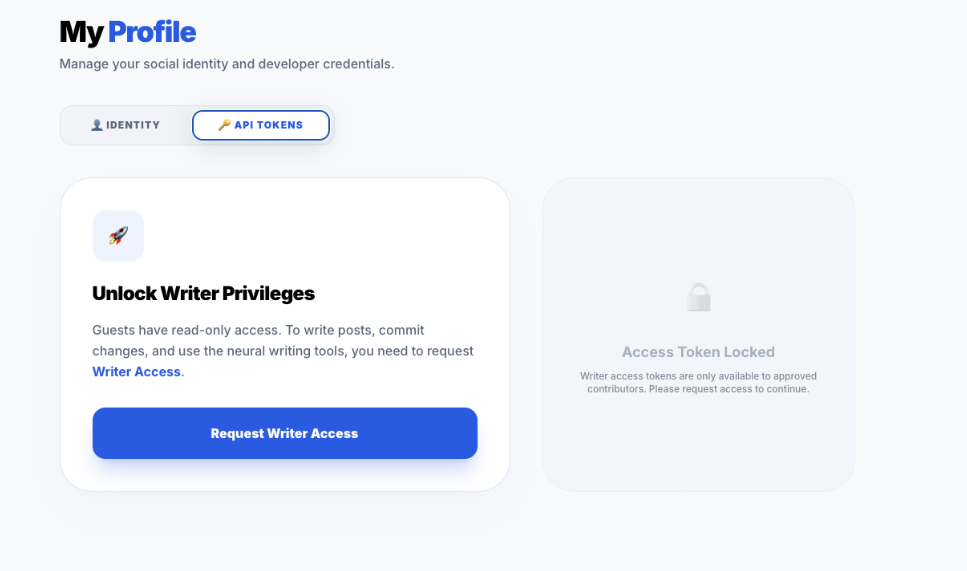 The UI explicitly gates the advanced features. This "Upsell" moment is crucial for user conversion logic. Notice the disabled state of the "Request" button until the user acknowledges the terms.
Phase 2: The Pending State
Once requested, the system locks the UI in a "Pending" state. This prevents spamming the API with duplicate requests. It provides immediate feedback that the system has heard them.
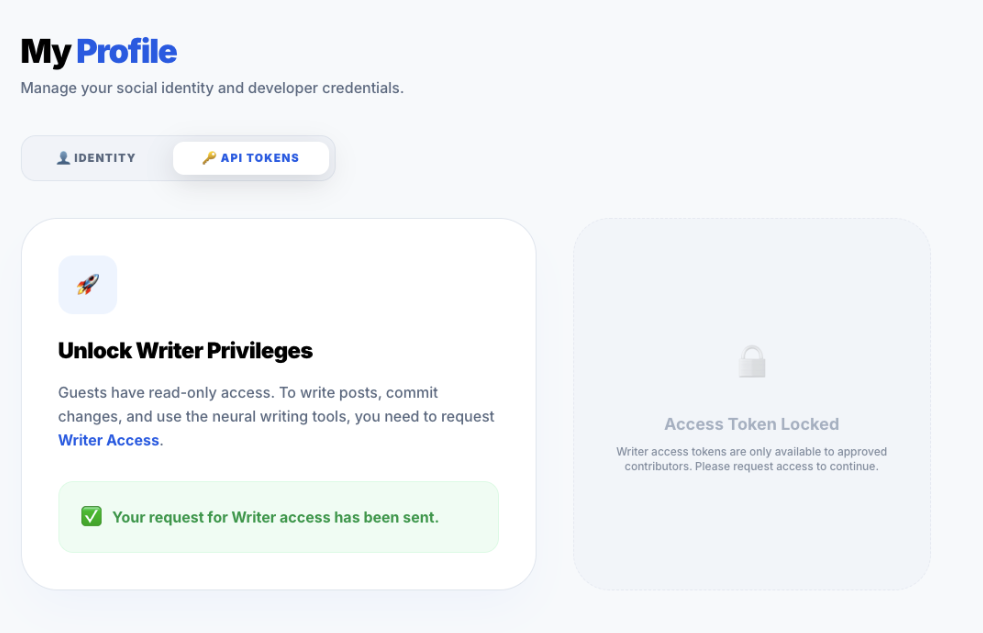 Visual feedback is key. We use a yellow pending badge to set expectations. The user is now in a "Limbo" state, maintained by the
 pendingRole column in Postgres.
Phase 3: The System Overview
Before approving, the Admin checks the overall health of the system on the main dashboard. They need context before they make a decision.
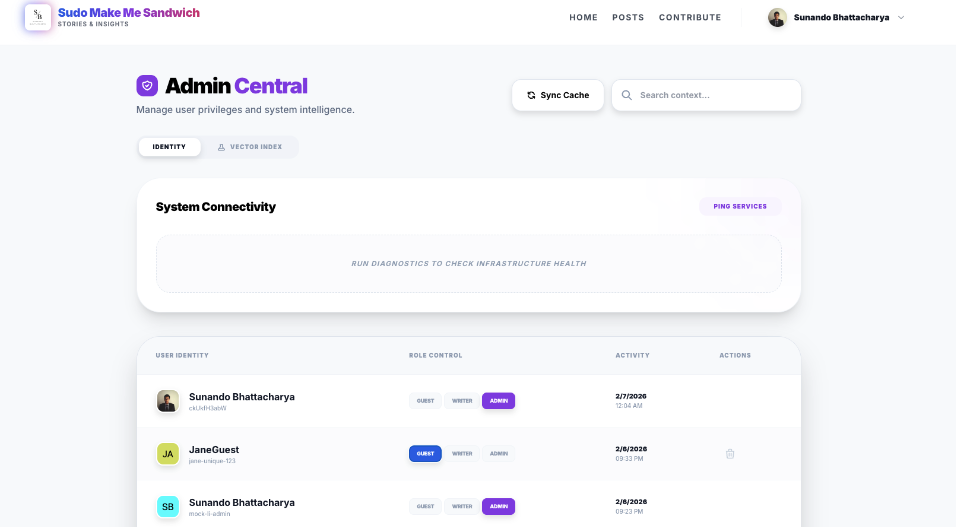 A "God Mode" view of the application state. It shows the Vector Index status (Green/Red), the number of active cached models, and the recent error rates.
Phase 4: The Admin Alert (Real-Time)
The Admin does not need to refresh. The Redis Pub/Sub pipeline pushes the notification instantly. This interrupts their workflow in a non-intrusive way to demand attention.
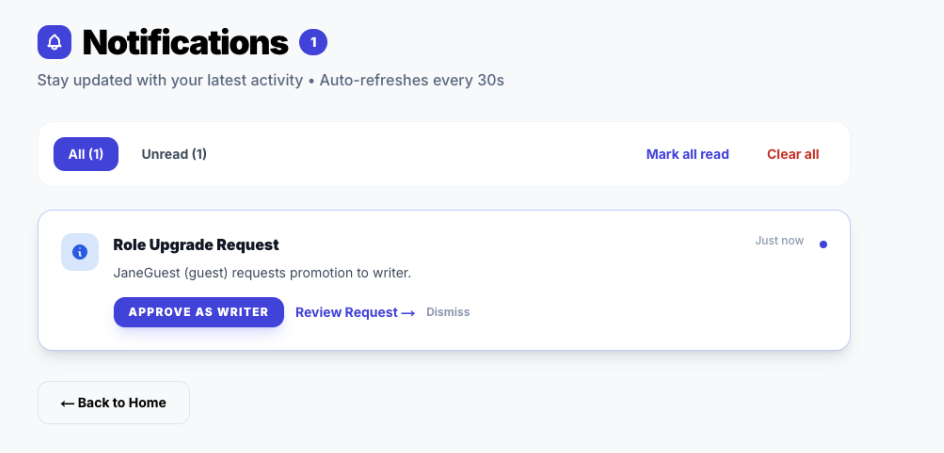 The Toast component subscribes to the
 notification-store which subscribes to the SSE stream. It appears regardless of which page the Admin is viewing.
Phase 5: The Approval Action
The Admin reviews the user's claims (via LinkedIn profile metadata) and clicks "Approve". This is the moment of trust.
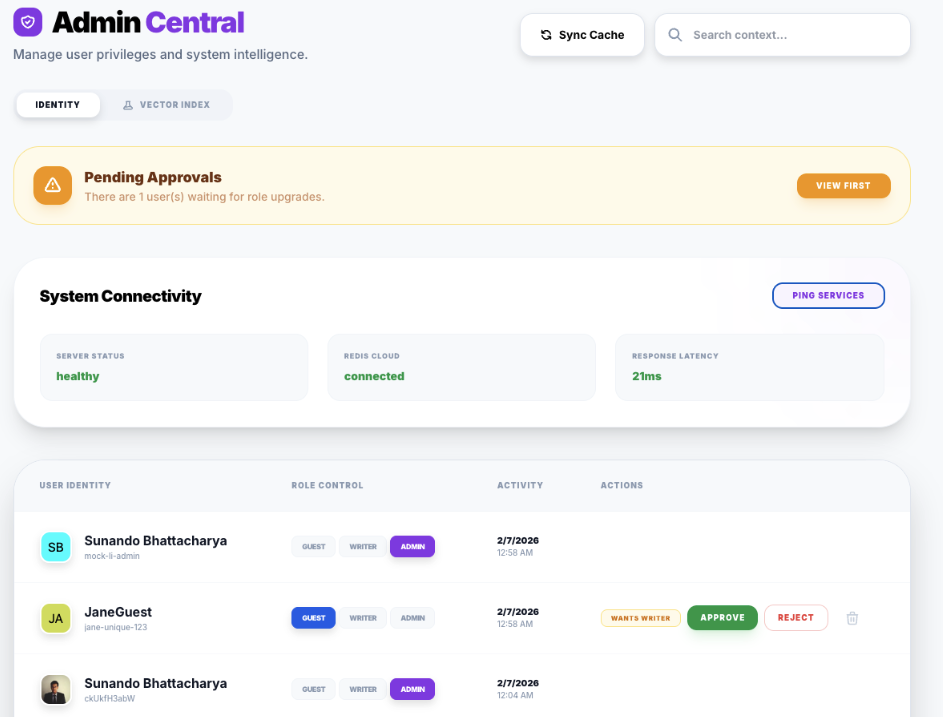 The atomic action that triggers the role update transaction in Postgres. Note the "Reject" button is also available, which would trigger a different notification flow.
Phase 6: The User Loop Closure
Finally, the user is notified. The system has completed the cycle. The user is now empowered.
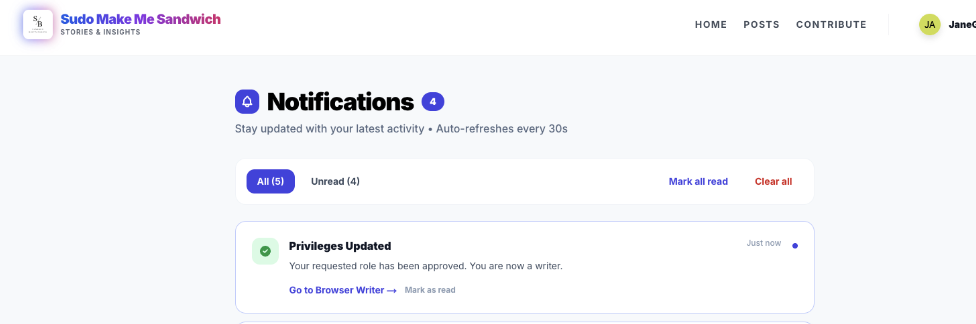 Positive reinforcement. The loop is closed. Clicking this notification deep-links the user directly to the Browser Writer Studio.
Part VI: The Edge (Local AI)
Chapter 5: WebGPU & The Browser Lab
Cloud AI is powerful, but it has three fatal flaws that prevent it from being the sole future of AI.
- Latency: The round-trip to Virginia (us-east-1) takes time. Even with fiber, the speed of light is a hard limit.
- Privacy: Sending sensitive drafts to a third party is a risk. Users want to know their diary entries aren't training the next GPT.
- Cost: Every token costs money. Scaling a free app with Cloud AI is a recipe for bankruptcy.
We wanted a Local-First AI. We utilized WebLLM, a library that compiles LLM weights into binary artifacts that can run on the consumer's GPU via WebGPU (WASM).
5.1 The Quantization Trade-off
We cannot run a 70B parameter model in Chrome. It would crash the tab. It would melt the battery. We use Quantization—reducing the precision of the model weights from 16-bit floating point (FP16) to 4-bit integers (INT4). This reduces the model size by ~75% with negligible loss in reasoning capability for simple tasks. We specifically selected SmolLM2-135M (for ultra-fast drafting) and Llama-3.2-1B (for reasoning). These models are the "Goldilocks" zone of performance and size.
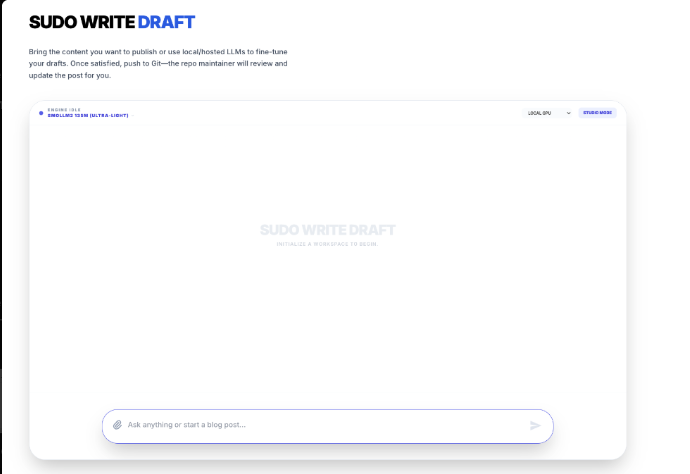 The Sudo Write Draft interface. Note the "Model Selector" dropdown. All of this runs on
 localhost.
5.2 The Web Worker Architecture
JavaScript is single-threaded. This is its greatest weakness in AI. If we run the Neural Network on the main thread, the UI will freeze every time the model predicts a token. The button clicks won't register. The scroll will jank. The user will leave.
We moved the Brain to a Web Worker. This is a separate thread of execution. The Main Thread (UI) sends messages to the Worker Thread (Brain). It creates a clean separation of concerns: The UI handles the human, the Worker handles the math.
// src/app/browser-writer/worker.ts
// The isolated brain in a jar

import { WebWorkerMLCEngineHandler } from "@mlc-ai/web-llm";

// The handler manages the WASM memory space
let handler: WebWorkerMLCEngineHandler;

self.onmessage = (msg: MessageEvent) => {
  if (!handler) {
    handler = new WebWorkerMLCEngineHandler();
  }
  // All communication happens via serializable JSON messages
  // Pattern: Command Pattern (Execute, Interrupt, Reload)
  handler.onmessage(msg);
};
The Message Passing Protocol
The communication isn't just "Generate this". It's a complex state machine that needs to handle interrupts, progress updates, and potential failures.
Main Thread -> Worker:
INIT { model: "Llama-3.2-1B-q4f32_1" }- "Please load this massive file into VRAM."GENERATE { prompt: "Hello", stream: true }- "Start thinking."INTERRUPT- "Stop! The user changed their mind."
Worker -> Main Thread:
PROGRESS { progress: 0.1, text: "Loading weights..." }- "I am working on it."READY- "I am awake."TOKEN { id: 2401, text: " The" }- "Here is a thought."DONE { stats: { tokensPerSecond: 45 } }- "I am finished."
This explicit protocol allows us to build a robust UI that can show loading bars, handle cancellations, and recover from Worker crashes.
5.3 EchoBot: The Result
The result of this architecture is EchoBot. An assistant that answers instantly, works offline (once cached), and costs $0.00 to run. It represents the democratization of AI.
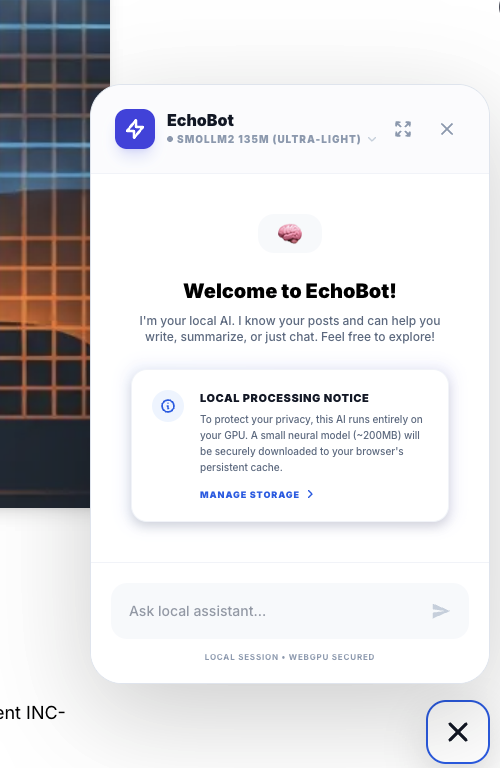 A privacy-preserving, zero-latency assistant. It is perfect for summarization tasks or quick grammar checks where sending data to the cloud is overkill.
Part VII: DevOps & Deployment
Chapter 6: Taming the Serverless Beast
Deploying complex AI apps to Vercel (AWS Lambda under the hood) is a nightmare of timeout limits. The Serverless promise is "Scale to Infinity", but the reality is "Scale to 10 Seconds". A generic Vercel function times out after 10 seconds (Hobby Tier). Our "Re-index All Posts" job involves:
- Fetching 50 posts.
- Chunking them.
- Embedding them (Google API calls).
- Saving to Postgres. This takes ~5 minutes. It is impossible to run in one request. It will die, leaving the database in a corrupted state.
6.1 The Recursive Batch Pattern
We invented a Self-Healing Recursive Looping Pattern. The client does not ask "Index Everything". The client asks "Do some work". It turns the client into the orchestrator.
- Client:
POST /api/sync(No params) - Server:
- Reads
database_cursor. - Processes 5 items.
- Saves new
database_cursor. - Returns
HTTP 200 { status: "CONTINUE", next_cursor: 5 }.
- Reads
- Client: Sees "CONTINUE". Immediately calls
POST /api/sync?cursor=5. - Repeat until Server returns
HTTP 200 { status: "DONE" }.
This breaks a monolithic 5-minute job into sixty 5-second jobs. It is robust. If one batch fails, we can retry just that batch. It fits perfectly within the Serverless constraints.
6.2 The vercel.json Configuration
To make this work, we also need to carefully tune the Vercel cron jobs and function memory. We cannot rely on defaults.
{
  "crons": [
    {
      "path": "/api/admin/sync",
      "schedule": "0 0 * * *"
    }
  ],
  "functions": {
    "api/admin/sync/route.ts": {
      "maxDuration": 60,
      "memory": 1024
    }
  }
}
We actively allocate more memory (1GB) to the sync function because the Markdown parsing and Embedding generation are CPU intensive. We pay a little more for memory to save a lot on execution time.
Part VIII: Conclusion and Future Roadmap
We have built something rare. A web application that is Self-Aware (via Vector Memory), Self-Governing (via MCP & RBAC), and Self-Sufficient (via Local WebGPU AI).
This is not just a blog. It is a Personal Intelligence Platform.
By owning the stack—from the postgres row to the React component—we have regained control from the walled gardens of Substack and Medium. We have built a home for our thoughts that is as intelligent as we are.
What's Next?
- Multi-Modal RAG: Storing embeddings for images to search our photo gallery semantically. Not just "cat.jpg", but "A photo of a cat sleeping in a sunbeam".
- Voice Mode: Using WebAudio API + Whisper (WASM) for voice conversations with the blog. Talking to your notes while driving.
- Federated Learning: Allowing users to train a LoRA adapter on their specialized writing style directly in the browser and upload just the adapter weights. Personalized AI without centralized training.
The future of the web is Agentic. And we just built the foundation.
Acknowledgments & Standing on the Shoulders of Giants (and StackOverflow)
This project was not built in a vacuum. It was built in a dimly lit room, fueled by excessive caffeine and the desperate hope that npm install would work this time.
I would like to extend my deepest gratitude to:
- Anthropic Academy: For teaching me that prompting is not "magic", it is just "writing very specific emails to a very literal intern."
- StackOverflow User AnswerSeeker99: Who asked my exact question in 2014. And to Admin, who marked it as "Duplicate" without linking the original. You built my character.
- Google Chrome DevTools Memory Tab: For revealing that my "lightweight" animation was actually consuming 4GB of RAM. We have made peace now.
- Curiosity: The fatal flaw that led me to say "I wonder how hard it would be to write my own vector database?" (Spoiler: Very hard).
- The Vercel Free Tier: The real MVP. I promise to upgrade to Pro the moment this blog makes $20.
- My Coffee Machine: You were the only one who didn't time out with a 504 Gateway Error or a 429 API Limit.
Sudo Make Me Sandwich.